Building always-on agents: the five primitives behind an agent that never clocks off
Event inbox, timers, memory, permissions, outbox: a living entry on Anthropic's guide to always-on agents, with the official diagrams and a dated history of the page.
An "always-on" agent isn't. That's the first thing Building always-on agents says, and it's what makes this architecture guide, published by Anthropic on November 13, 2026, worth reading: it swaps a marketing promise for a build plan. This entry sums up what the page says today, with the official diagrams, and the history at the bottom will date every change.
What "always-on" means
Anthropic defines these agents by two properties: they keep state from one session to the next, and they are proactive, meaning they act without direct supervision. The core is still the loop described in Building effective agents. What changes is the architecture around it.
The article's vocabulary comes down to two words:
- a run is a stretch of work: the agent receives an event, does its task, saves what happened;
- a session is the transcript of messages and tool calls a run works inside.
Why now. The article gives two reasons for the comeback. Recent models have better judgment about when to check in with the user. And intelligence is getting cheaper, most of all on long tasks: on one long-horizon coding benchmark, Opus 5.5 cost 78% less per solved task than Opus 5, compared with 40% less on typical workloads (Anthropic). That is Anthropic measuring its own model, and should be read that way.
Primitive 1: the event inbox
Most agents only run when you message them. An always-on agent is triggered by webhooks, scheduled tasks or background jobs.
The tempting design is to let each source call the agent directly. The article names the two failures that causes: two simultaneous events start competing runs, and a crash loses an event. Hence an inbox, with three components:
- a durable list of events, usually a database table;
- a handler, usually an HTTP endpoint, that writes to it;
- a worker, usually a background service, that reads from it.
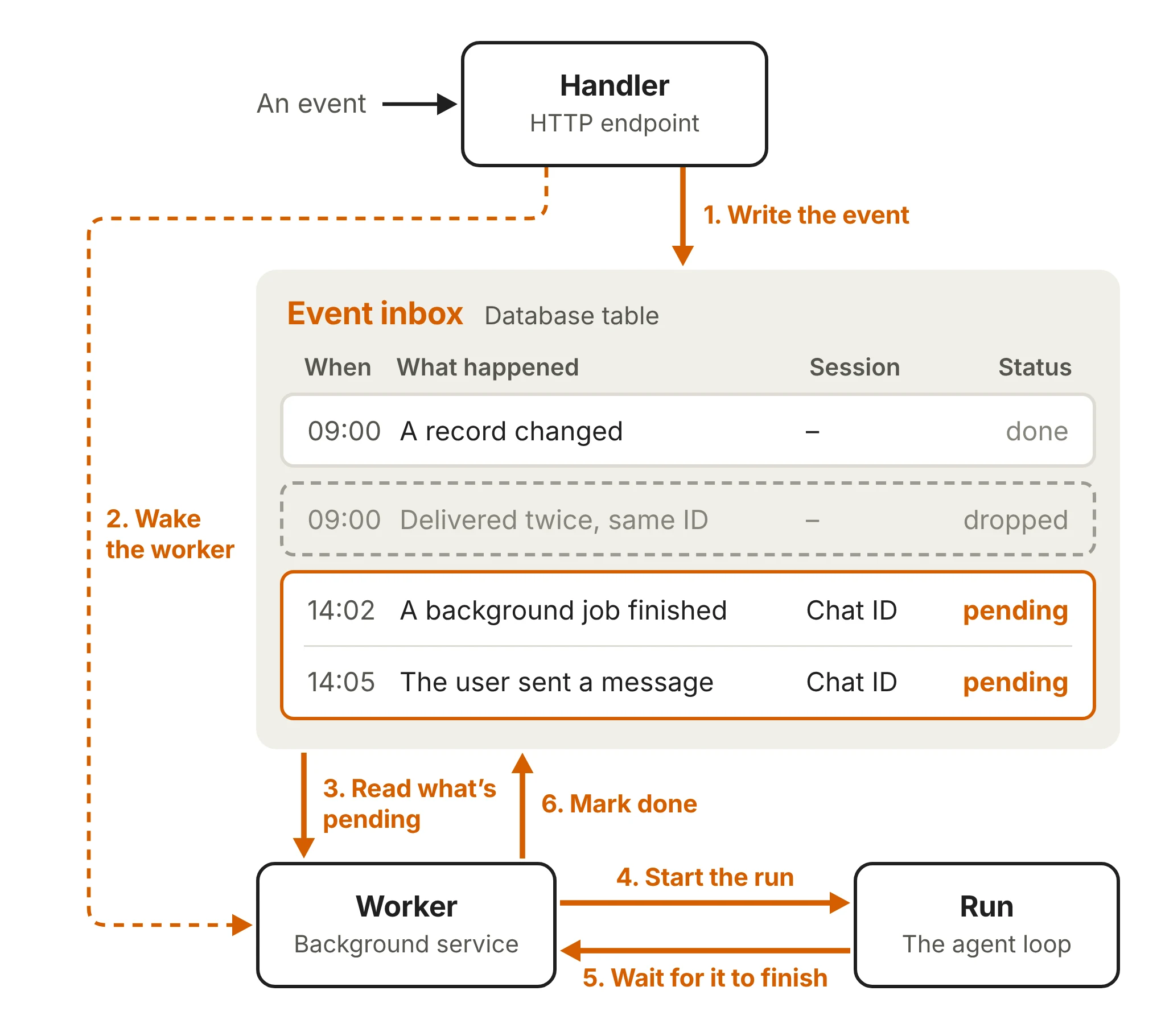
Four rules come with the diagram:
- The handler acknowledges quickly. Some webhook providers treat a slow response as a failure. Heavier checks, such as looking for prompt injection, happen during the run.
- The inbox is the source of truth. A woken worker reads the inbox first. If it dies mid-run, another one picks up the same event.
- One active worker per inbox. Otherwise two runs overwrite each other.
- The worker batches pending events. Three messages in a row produce one run, and so one reply.
Anthropic recommends starting with one inbox per user.
Primitive 2: timers
Timers are what make the agent proactive. There are two kinds:
- a follow-up, a deadline the agent sets for itself, such as checking whether someone replied;
- a schedule, a recurring task on a known cadence, such as a daily newsletter.
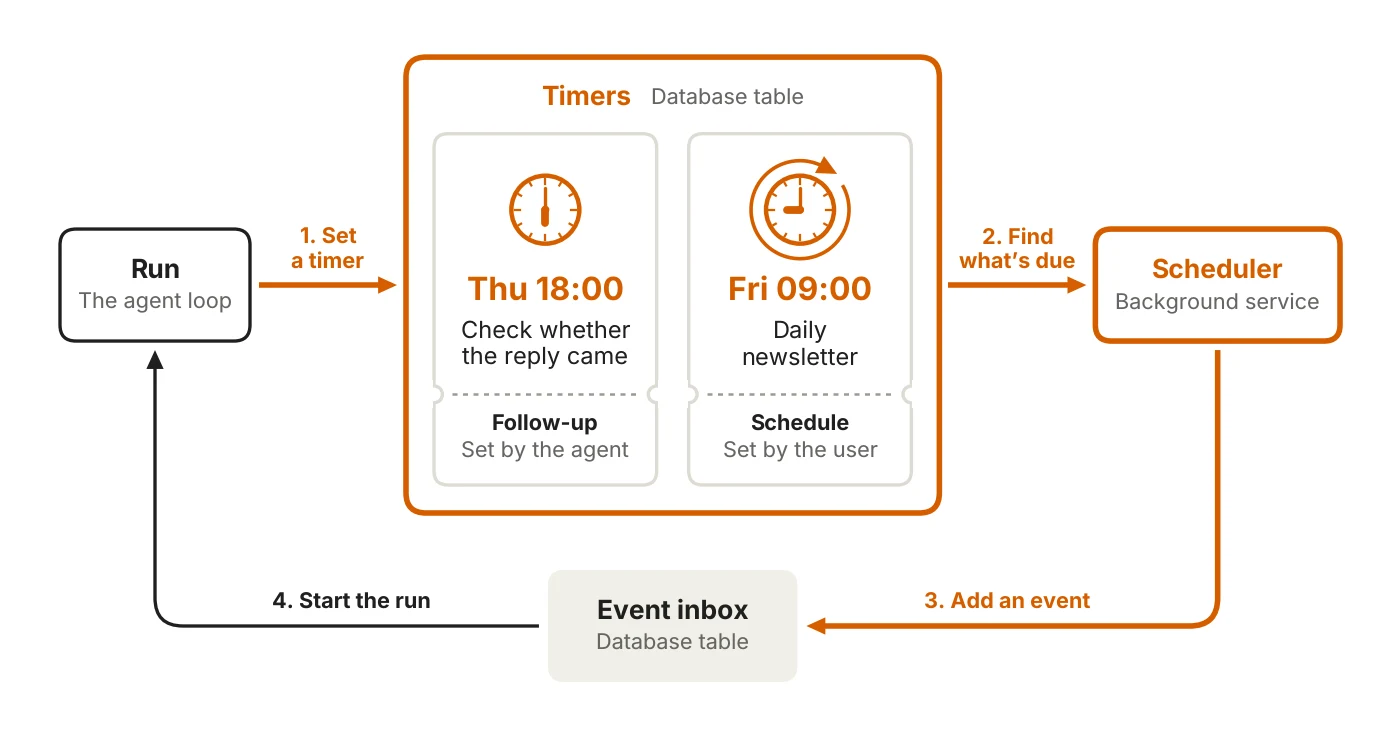
The point that prevents design mistakes: a timer doesn't start a run. It lives in its own store, separate from the inbox, and a scheduler polls that store at a fixed interval. For each timer that's due, it marks the follow-up done or computes the next occurrence, then adds an event to the inbox. So there is a single way in to the agent.
Primitive 3: memory
An agent working in disconnected runs has no continuity except its memory. In Anthropic's products it takes the form of a directory of files. That's the case for Claude Code's auto memory and for the API's memory tool. For an always-on agent, that directory has to sit on durable storage so it outlives the worker.
The rule to remember is short: memory only holds what the agent can't look up again. If the information already lives elsewhere, in an issue tracker for instance, you save a pointer.
The article separates four kinds of content:
| Content | Role | Loaded |
|---|---|---|
| User instructions | What the user asked about the agent's behavior | Every run |
| User notes | Role, preferences, corrections received | An index every run, details on demand |
| Past messages | Avoid repeating yourself | Every run |
| Task progress | Pick up where the previous run left off | An index every run, details on demand |
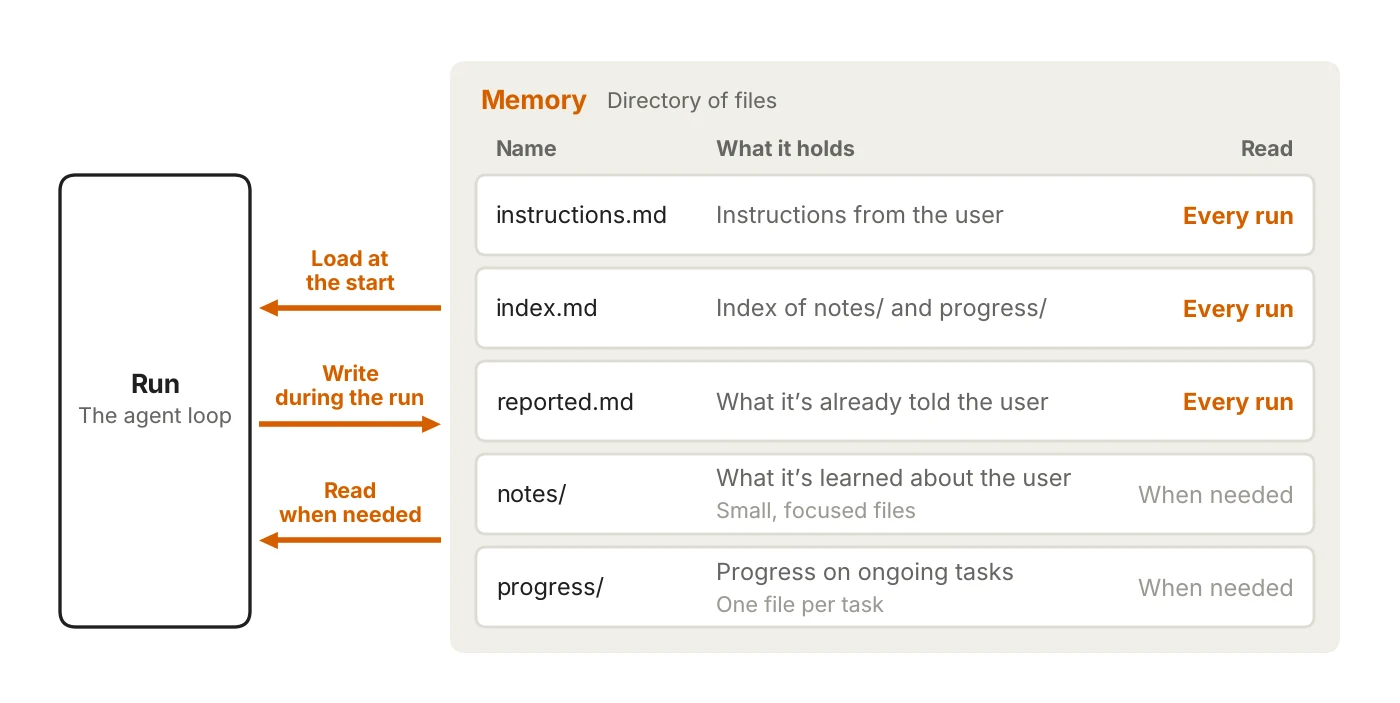
On top of that comes dreaming, a pass that reviews past sessions to replace outdated entries and spot patterns that only show up across many runs.
The hidden cost. System prompt, tool definitions and memory files are reloaded on every run. Anthropic recommends keeping that overhead lean and using prompt caching. When a session grows too long, there are two options: compact the older messages or start a new session. Both lose detail, so anything that must persist gets written to memory along the way.
Primitive 4: permissions
This is where the risk is highest, and the article says so plainly: a run holds the user's access and operates unattended. For each tool call, the agent has to decide whether to proceed, block, or wait for approval. Three mechanisms, the same ones other agents use:
- A credential store out of the agent's reach. A proxy outside its environment adds credentials to outgoing requests. The agent never sends a secret itself.
- Auto mode. Classifiers review higher-risk actions and block the ones they judge dangerous, as in Claude Code. The article notes that user review is still needed for the most important decisions.
- Deferred tool calls. The run ends, the session is saved mid-call, the request is shown to the user. Their answer comes back as an event in the inbox and resumes the session where it stopped. Meanwhile the worker handles other events.
Primitive 5: the outbox
A regular agent streams its answer as it goes. This one works in the background: the user gets the outcome and a few details, not the step-by-step. A run ends in one of three ways: a message sent, nothing to say, or a deferred call asking for approval.
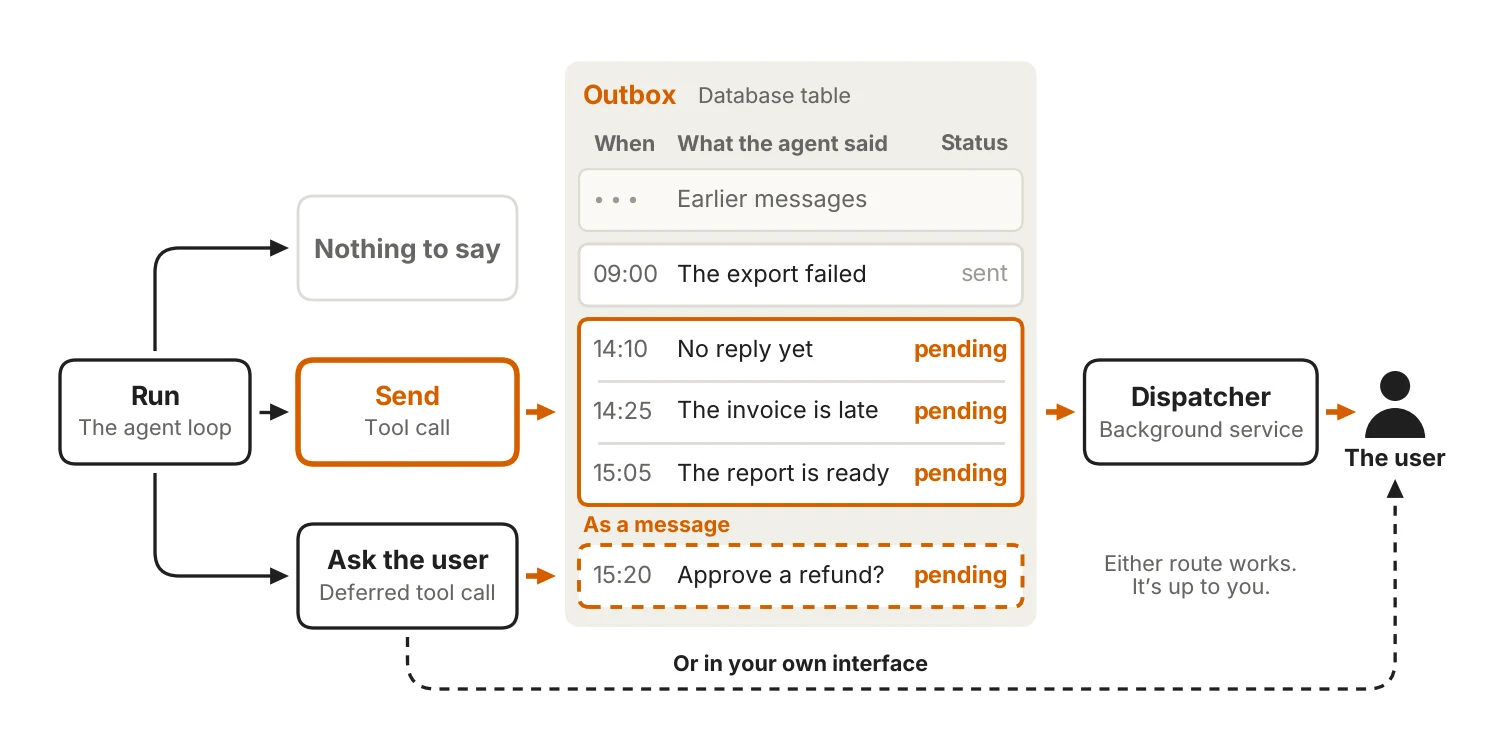
The guide plays down its own primitive: most agents can get by with a simple send tool. A formal outbox is only worth it to pace messages or let the agent recover from errors.
The hardest setting isn't technical. Too many messages and the agent becomes noise, too few and it misses what matters. Anthropic recommends building evals to find the balance, the subject of the other entry tracked here, and starting quiet: the agent earns the user's attention over time.
How the five fit together
Every run starts with an event from the inbox, whether it comes from a message, a webhook or a timer. The worker starts the run in a new or existing session. The agent reads its memory, acts within its permissions, updates its memory, then pushes a message to the outbox. The loop closes in two ways: a run can set a timer, and the user's reply comes back as an event.
The official page shows this cycle in three animated diagrams I don't reproduce here: go and see them at the source.
What I take from it
Three things, which are my opinion and not the article's.
- It's a plan, not a product. No pricing, no availability, no new API. You can apply it with any database and a background service.
- The single way in is the strong idea. Timers, webhooks and replies all go through the inbox. That's what makes the system debuggable: everything the agent did has a row somewhere.
- You don't have to build all of it. If what you need is a scheduled task running in the cloud, Claude Code Routines already provide the trigger and the execution. This guide is for when you're building that behavior into your own product.
History of the official page
Every change, dated and verifiable. Most recent first.
- Published verify
Published by William Hu on claude.com, in the articles section. Rodrigo Olivares and Michael Segner are thanked for their contributions.

Pierre Rondeau
AI Engineer. I build AI agents and get them ready for production: datasets, evals, observability. Creator of Claude Hub.
LinkedIn